2016年8月11日 星期四

why selector not work?

5.why selector not work?

not work

<?xml version="1.0" encoding="utf-8"?>
<selector xmlns:android="http://schemas.android.com/apk/res/android">
   <item android:drawable="@color/colorPrimaryDark" />
   <item android:drawable="@color/buttonPressColor" android:state_pressed="true" />
</selector>


work

<?xml version="1.0" encoding="utf-8"?>
<selector xmlns:android="http://schemas.android.com/apk/res/android">
   <item android:drawable="@color/colorPrimaryDark" android:state_pressed="false"/>
   <item android:drawable="@color/buttonPressColor" android:state_pressed="true" />
</selector>

How to make the Radial reaction on the button?

How to make the Radial reaction on the button?
see:https://guides.codepath.com/android/Ripple-Animation

How to change the Edittext bottom line Color?

How to change the Edittext bottom line Color?


<style name="Theme.App.Base" parent="Theme.AppCompat.Light.DarkActionBar">
   <item name="colorControlNormal">#c5c5c5</item>
   <item name="colorControlActivated">@color/accent</item>
   <item name="colorControlHighlight">@color/accent</item>
</style>

How to use custom font

1.How to use custom font
We're going to use a basic layout file with a TextView, marked with an id of "custom_font" so we can access it in our code.
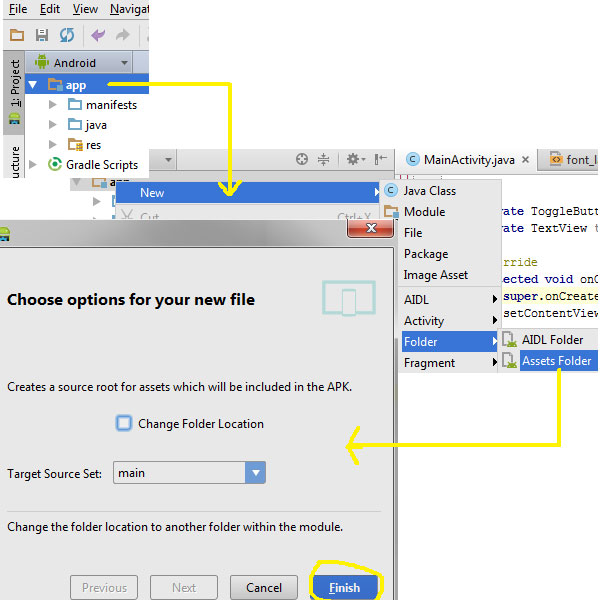
Download it and place the TTF file in the ./assets directory (create it if it doesn't exist yet).


Open your main activity file and insert this into the onCreate() method:
1
2
3
TextView txt = (TextView) findViewById(R.id.custom_font);
Typeface font = Typeface.createFromAsset(getAssets(), "Chantelli_Antiqua.ttf");
txt.setTypeface(font);
The Typeface class contains a static builder method createFromAsset, which takes an AssetManager as its first parameter and a path to the file in the second argument. We're handing it the default asset manager and the name of the font file because it's located in the root of the "assets" folder. Once we've got an instance of our custom typeface, all that's left is a call to TextView's setTypeface() method. Simple, huh? It might also be wise to organize your fonts into a subdirectory if your assets directory is packed with other files.

There are a few potential problems that custom typefaces come with, though. Ellipsizing might not work correctly if the font doesn't have a glyph for the special ellipsis character and internationalization might not be supported, as your font would have to handle any language that users might input. You'll also want to keep an eye on the total size of your custom fonts, as this can grow quite large if you're using a lot of different typefaces.

how to add a border to a text in text view android?

how to add a border to a text in text view android?

<TextView
   android:layout_width="match_parent"
   android:layout_height="wrap_content"
   android:text="@string/hello_world"
   android:textColor="#f8f36a"
   android:textSize="65sp"
   android:shadowColor="#ff0000"
   android:shadowRadius="2"/>

How to make Like this(Scroll)?

How to make Like this(Scroll)?

Library:
compile 'com.android.support:appcompat-v7:24.0.0'
   compile 'com.android.support:design:24.0.0'


XML:

<?xml version="1.0" encoding="utf-8"?>
<android.support.design.widget.CoordinatorLayout xmlns:android="http://schemas.android.com/apk/res/android"
   xmlns:app="http://schemas.android.com/apk/res-auto"
   xmlns:tools="http://schemas.android.com/tools"
   android:layout_width="match_parent"
   android:layout_height="match_parent"
   android:fitsSystemWindows="true"
   tools:context="pom.poly.com.tryscroll.ScrollingActivity">

   <android.support.design.widget.AppBarLayout
       android:id="@+id/app_bar"
       android:layout_width="match_parent"
       android:layout_height="@dimen/app_bar_height"
       android:fitsSystemWindows="true"
       android:theme="@style/AppTheme.AppBarOverlay">

       <android.support.design.widget.CollapsingToolbarLayout
           android:id="@+id/toolbar_layout"
           android:layout_width="match_parent"
           android:layout_height="match_parent"
           android:fitsSystemWindows="true"
           app:contentScrim="?attr/colorPrimary"
           app:layout_scrollFlags="scroll|exitUntilCollapsed">
           <ImageView
               android:layout_width="match_parent"
               android:src="@mipmap/ic_launcher"
               android:layout_height="match_parent" />

           <android.support.v7.widget.Toolbar
               android:id="@+id/toolbar"
               android:layout_width="match_parent"
               android:layout_height="?attr/actionBarSize"
               app:layout_collapseMode="pin"
               app:popupTheme="@style/AppTheme.PopupOverlay" />

       </android.support.design.widget.CollapsingToolbarLayout>
   </android.support.design.widget.AppBarLayout>

   <include layout="@layout/content_scrolling" />

   <android.support.design.widget.FloatingActionButton
       android:id="@+id/fab"
       android:layout_width="wrap_content"
       android:layout_height="wrap_content"
       android:layout_margin="@dimen/fab_margin"
       android:src="@android:drawable/ic_dialog_email"
       app:layout_anchor="@id/app_bar"
       app:layout_anchorGravity="bottom|end" />

</android.support.design.widget.CoordinatorLayout>


<?xml version="1.0" encoding="utf-8"?>
<android.support.v4.widget.NestedScrollView xmlns:android="http://schemas.android.com/apk/res/android"
   xmlns:app="http://schemas.android.com/apk/res-auto"
   xmlns:tools="http://schemas.android.com/tools"
   android:layout_width="match_parent"
   android:layout_height="match_parent"
   app:layout_behavior="@string/appbar_scrolling_view_behavior"
   tools:context="pom.poly.com.tryscroll.ScrollingActivity"
   tools:showIn="@layout/activity_scrolling">

   <TextView
       android:layout_width="wrap_content"
       android:layout_height="wrap_content"
       android:layout_margin="@dimen/text_margin"
       android:text="@string/large_text" />

</android.support.v4.widget.NestedScrollView>

after rotate the spinder can’t control the fragment

after rotate, the spider can’t control the fragment

it is because the reference to the fragment lost after rotate,(the activity create again,show lost),but the fragment still here,we just need to find it bu tha

I find the the savedInstanceState auto,so we can

use  if (savedInstanceState == null) {

           mainFragment = new MainFragment();
           Logger.d("create a mainFragment");
           fragmentTransaction.add(R.id.frame_layout_main, mainFragment);
           fragmentTransaction.commit();

       }


and find that mainFragment is null after rotate,so we need to get it back